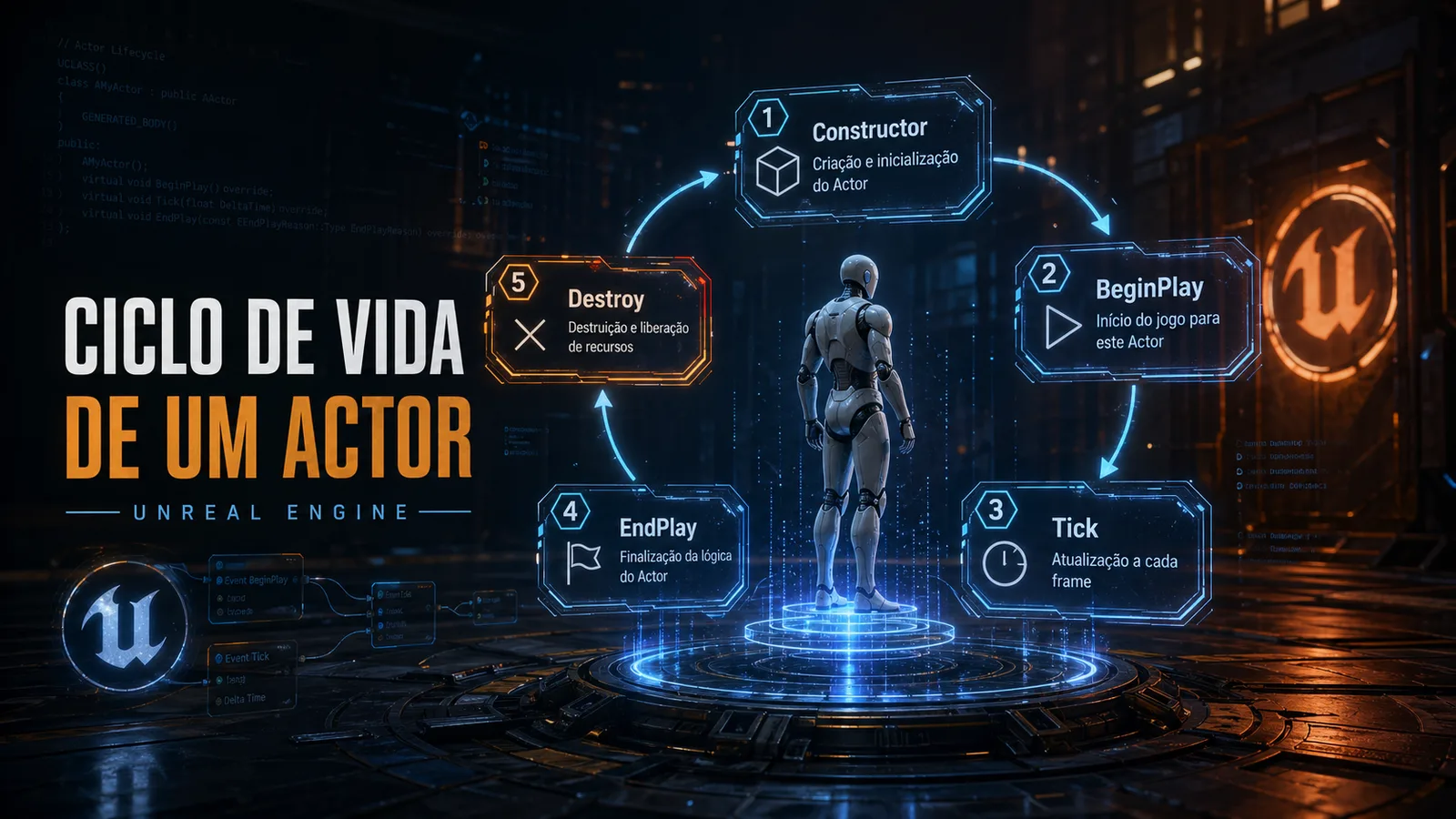
When I started studying Unreal Engine more carefully, I realized that many gameplay problems become easier to understand when we understand the lifecycle of an Actor.
An Actor is not just “an object in the scene.” It goes through stages. It is created, initialized, can receive components, can execute logic at the start of the game, can update every frame, and can eventually be destroyed.
Understanding this order helps avoid bugs, poor coupling, and confusion about where each piece of logic should live.
What an Actor is
In Unreal Engine, an Actor is an entity that can exist in the game world.
It can represent many things:
- a character;
- a door;
- a collectible item;
- a projectile;
- an enemy;
- a camera;
- a trigger volume;
- an interactive object.
Not every Actor needs visuals. Some exist only to control logic.
This flexibility is powerful, but it also creates a trap: it is easy to put too much logic in a single Actor without thinking about its real role.
Why the lifecycle matters
When something goes wrong in an Unreal project, a common question is:
“Is this logic running at the right moment?”
Sometimes the problem is not the logic itself, but the moment when it is executed.
For example:
- a reference has not been initialized yet;
- a component is not ready yet;
- a variable was configured in the editor but overwritten in BeginPlay;
- an Actor was destroyed, but another system is still trying to access it;
- logic is running in Tick, but should happen only once.
That is why understanding the lifecycle helps decide where each responsibility belongs.
Constructor
The constructor runs when the object is created.
In C++, it is usually used to configure default values and create components.
A common example:
AMyActor::AMyActor()
{
    PrimaryActorTick.bCanEverTick = true;

    MeshComponent = CreateDefaultSubobject<UStaticMeshComponent>(TEXT("MeshComponent"));
    RootComponent = MeshComponent;
}
This is not the best place to access things that depend on the world already running.
I like to think of the constructor as the place to say:
“This Actor has this basic structure.”
Not:
“This Actor will already search for other objects and execute gameplay.”
BeginPlay
BeginPlay is called when the game starts for that Actor.
This is usually a better place to start gameplay logic, because the Actor is already in the world and the game execution has begun.
Examples of things that can make sense in BeginPlay:
- getting initial references;
- initializing state;
- registering events;
- configuring gameplay values;
- triggering initial logic.
But it is also common to overuse BeginPlay.
When everything starts being placed inside it, the Actor becomes a huge initialization block that is difficult to maintain.
Tick
Tick runs every frame, if it is enabled.
It can be useful, but it should be used carefully.
Not every Actor needs Tick. In fact, many systems can work better with events, timers, delegates, or callbacks.
A common mistake is putting logic in Tick that could happen only when something changes.
Bad example:
void AMyActor::Tick(float DeltaTime)
{
    CheckIfPlayerIsNear();
}
Depending on the case, this could be solved with overlap events, a trigger volume, or another event-based approach.
The question I try to ask is:
“Does this really need to run every frame?”
If the answer is no, it probably should not be in Tick.
EndPlay and Destroy
When an Actor leaves the world, Unreal can call EndPlay.
This can happen for several reasons:
- the Actor was destroyed;
- the level was unloaded;
- the game ended;
- there was a map transition.
This is an important moment to clean references, cancel timers, or remove event bindings when needed.
In larger projects, forgetting this step can cause bugs that are difficult to track.
A simple way to think about it
For now, my practical way of organizing the lifecycle is:
- Constructor: structure and default values.
- BeginPlay: start of gameplay logic.
- Tick: continuous logic that truly needs to run every frame.
- EndPlay: cleanup and shutdown.
This split does not solve every case, but it already helps a lot.
Where this appears in gameplay
This knowledge appears all the time.
For example, in a door system:
- in the constructor, I create the components;
- in BeginPlay, I configure the initial state;
- in interaction events, I open or close the door;
- I may use Tick or a Timeline to animate it;
- in EndPlay, I clean any registered references or events.
In an enemy:
- in the constructor, I define basic components;
- in BeginPlay, I initialize behavior;
- in Tick, I may update perception or movement, if needed;
- in Destroy, I remove effects, drops, or references.
My current conclusion
Understanding the lifecycle of an Actor is an important foundation for writing better systems in Unreal Engine.
It is not just about memorizing functions. It is about understanding the right moment for each responsibility.
The more I study Unreal, the more I notice that many problems come from logic placed in the wrong place.